Smart Recommendations: Improving user onboarding for Everlaw users
80% of users never get trained on Everlaw before using it. I designed a contextual guidance system that appeared at the moment they needed help.
Result
53% completion rate
of all recommendations, meaning more than half of users who saw a suggestion followed through on it
Problem
Most users don't go through training before logging into Everlaw for the first time.
Imagine you are a paralegal, working on a new case with a firm that uses Everlaw. You've never used it before, so you click around until you find the search page, query 50,000 documents, and... then what?
This was the reality for 80% of new Everlaw users. Even users who did receive training often learned about features weeks before they needed them, and by that point, they would have forgotten what they'd learned.
Explorations
Early on, we almost built the wrong thing.
The initial pitch was a sandbox—a demo environment where users could practice and learn the platform. But after talking with my PM, we recognized the core problem: once users left the sandbox and returned to their real project, everything would reset.
We pivoted: what if we met users in their actual work, at the moment they needed help?
How might we help users learn features at the moment they need them, within their actual work?
I was responsible for the following:
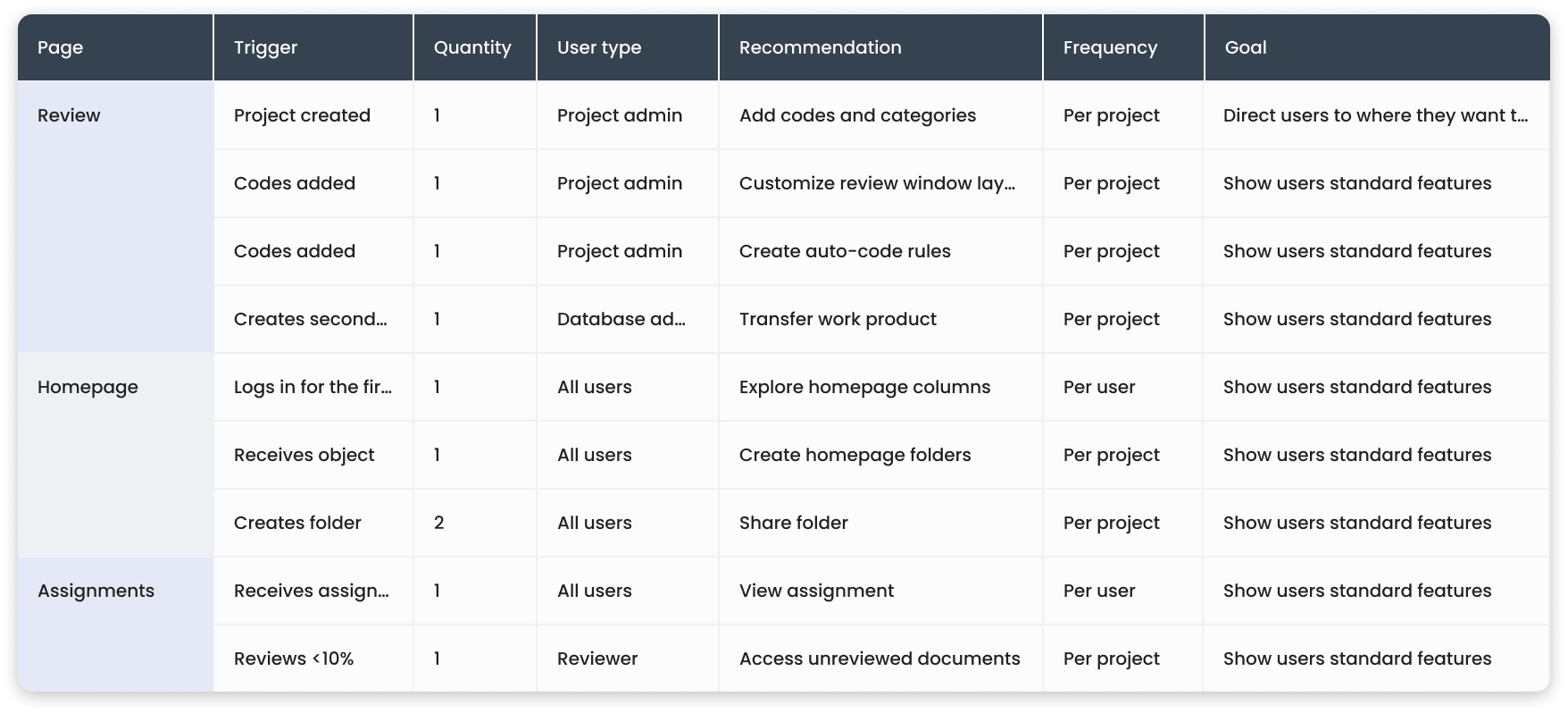
Matrix of triggers and recommendations across user types
Key Decisions
Guiding users through "smart" recommendations
I designed a contextual guidance system that meets users exactly where they are. As they navigate the platform, the system offers helpful, real-time recommendations that provide immediate feedback on their work. This approach doesn’t just guide them through their tasks, it also highlights powerful features that might otherwise stay hidden in the background.
👆🏻 One recommendation at a time
Everlaw pages are dense. Bombarding users with multiple tips at once would add noise, not clarity.
I designed single, focused recommendations that appeared based on user behavior—a subtle nudge toward the next logical step. If a user just finished uploading documents, they'd see a recommendation to run a production protocol, pointing directly to the feature.
Recommendation appears after completing a task
🕹️ Respecting power users from the first moment
I could've buried the "disable" option deep in settings. Experienced users would have no easy way to opt out, leading to frustration and reducing trust in the feature.
Instead, the very first recommendation points to where users can turn off recommendations entirely (or selectively for pages they already know). Users who feel in control engage more with the feature.
The first recommendation points to the place to turn the feature off
🌎 A help menu that actually knows where you are
The old help menu was identical on every page: generic links to contact customer support and view training videos. It didn't adapt to the user's current context or workflow.
I redesigned the help menu to be contextual—surfacing relevant recommendations based on the user's current workflow. Instead of a static list, users now see guidance tailored to the page they're on.
A contextual help menu that leads to all recommendations
Impact
After 2 years of design and development
completion rate of all recommendations
for common "how do I..." questions
We shipped this project in August 2024 to all Everlaw users, enabling it by default for new accounts. Upon release, we found a 53% completion rate of the recommendations, meaning more than half of users who saw a suggestion followed through on it.
"In-platform help features (smart recommendations and Everlaw walkthroughs) were well-received, described as 'very useful,' and frequently referenced during their evaluation."— Everlaw sales representative after talking to a new customer
Learnings
Looking back on this project
After 1 year of design and 2+ years of development, I learned how to manage working relationships with cross-functional teams. What I learned:
📖 Create a single source of truth on day one
With 50+ recommendations across different user types, tracking everything became its own project. I built a shared spreadsheet that technical writing, sales, and support all referenced, but I wish I'd done it from the beginning.
👩🏻🏫 Designing onboarding meant learning the whole product
I had to build a deep understanding of the entire platform and all our user personas, becoming an expert in parts of Everlaw I'd never touched: predictive coding workflows, production protocols, etc. It made me a better designer for every project that followed.